
Methodology. Forensic reconstruction from public disclosures by StepSecurity, Huntress, Socket Security, Synk, Microsoft Security Blog, and Security Labs, as well as direct statements provided by the victim.
Overview
History repeats itself. Threat actors continue to target massively adopted open-source libraries as a force multiplier and this time, the victim was Axios, one of the most popular JavaScript HTTP client libraries, averaging nearly 100 million weekly downloads.
From the moment the library was poisoned, it took approximately three hours for the community to identify the compromise and for the npm security team to take action, ultimately removing both malicious versions: axios@1.14.1 and axios@0.30.4.
The malicious packages were detected by StepSecurity through their Harden-Runner security solution, which monitors all network communications occurring within CI/CD runners and flags anomalous outbound connections in this case, to sfrclak.com:8000.
TL;DR
The primary npm maintainer account for Axios was compromised through a sophisticated social engineering campaign. The attacker immediately changed the account email to
ifstap@proton.meand proceeded to publish a malicious dependency (plain-crypto-js@4.2.1) containing a RAT dropper, which was subsequently injected as a dependency in new poisoned versions of Axios (1.14.1and0.30.4).
Disclosure Note: This report is intended to raise awareness of how npm package installation works at a native level and how threat actors can exploit these capabilities. This attack pattern is not unique to JavaScript. Python and other ecosystems expose similar risks. A dedicated technical analysis of the
setup.jsdropper and the deployed RAT will be published in a follow-up report.
How the Attack Works
Step 1 — Compromising the Axios npm Maintainer Account
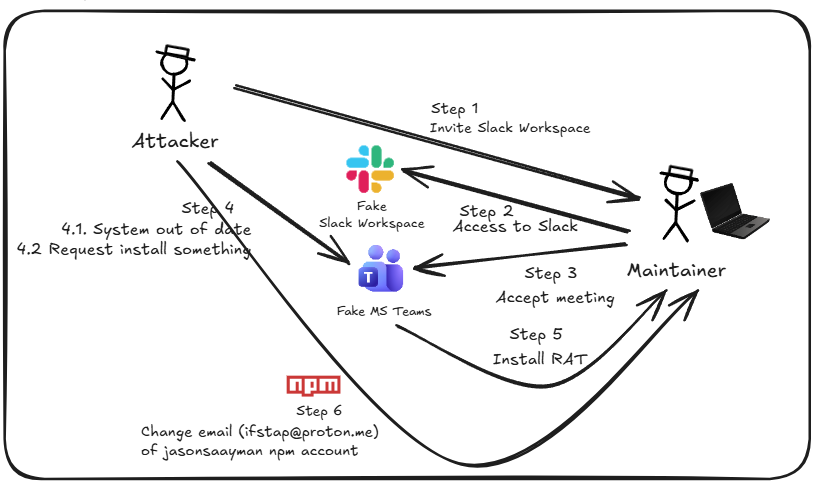
The campaign began when the threat actor reached out to the primary Axios library maintainer, posing as the founder of a legitimate company. The victim was invited to join a Slack workspace that had been carefully crafted for credibility, featuring active channels linked to the real company’s public social media presence.
Once inside the workspace, the victim was invited to a virtual meeting. The meeting platform was a spoofed environment built with a realistic Microsoft Teams interface, leveraging the official SDK to further enhance the illusion of legitimacy.
During the call, the victim was presented with a system message indicating their device was out of date, likely citing audio or video issues, and was prompted to install a “fix.” This “fix” was in fact a Remote Access Trojan (RAT) designed to harvest sensitive information from the compromised system, including:
.npmrctokens- Active browser sessions
- Cloud provider credentials
- Other stored credentials and secrets
Key Insight: Once the attacker obtained the victim’s npm access token, two-factor authentication (2FA) was effectively bypassed. This is because 2FA is not enforced on every API request made to npm or other external systems. Session tokens are sufficient to authenticate.
Step 2 — Preparing the Malicious Dependency
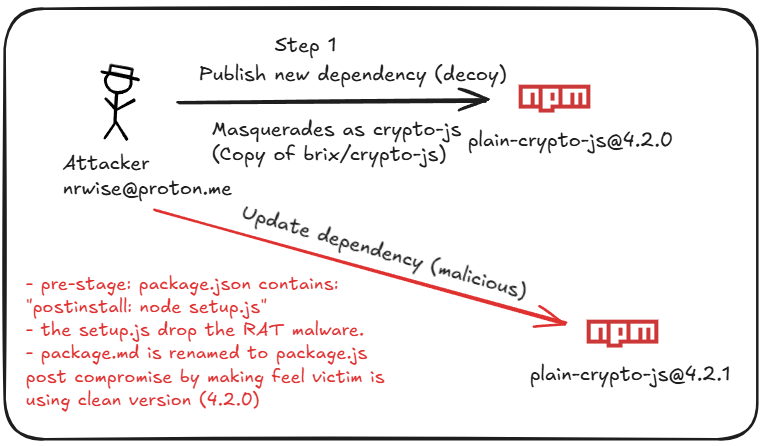
Before publishing the poisoned Axios version, the threat actor prepared a malicious dependency using the account nrwise@proton.me. The attack sequence was methodical:
- Published a new package called
plain-crypto-js@4.2.0, cloning the content, description, and repository URL of the legitimatecrypto-jslibrary to establish a credible history. - Created a malicious update,
plain-crypto-js@4.2.1, containing two key files:
setup.js
A malicious dropper script that installs a RAT malware on the victim’s machine upon package installation.
package.md
A metadata decoy file. During installation of version 4.2.1, this file gets renamed to package.json, displaying version 4.2.0 and deceiving the victim into believing they have a clean, uncompromised installation.
Package Comparison
crypto-js@4.2.0 (legitimate — no postinstall) | plain-crypto-js@4.2.1 (malicious — postinstall dropper) |
|---|---|
"scripts": { "test": "grunt" } | "scripts": { "test": "grunt", "postinstall": "node setup.js" } |
Operational Security Note: The decoy version (
4.2.0) was published 18 hours prior to the attack, establishing a publication history to make thenrwiseaccount appear as a legitimate and established maintainer.
How npm Package Installation Works
During npm package installation, the runtime allows scripts to execute before and after the installation process. This native capability is designed to automate package-specific setup tasks. The standard installation flow is:
npm install → install dependencies → preinstall → install → postinstallScripts are declared in the package.json file under the "scripts" key. Threat actors exploit this native capability, which is rarely monitored or detected by traditional security controls (AV, EDR, etc.), to embed malicious scripts. In this case, it served as the delivery mechanism for the RAT malware dropper.
Step 3 — Injecting the Malicious Dependency into Axios
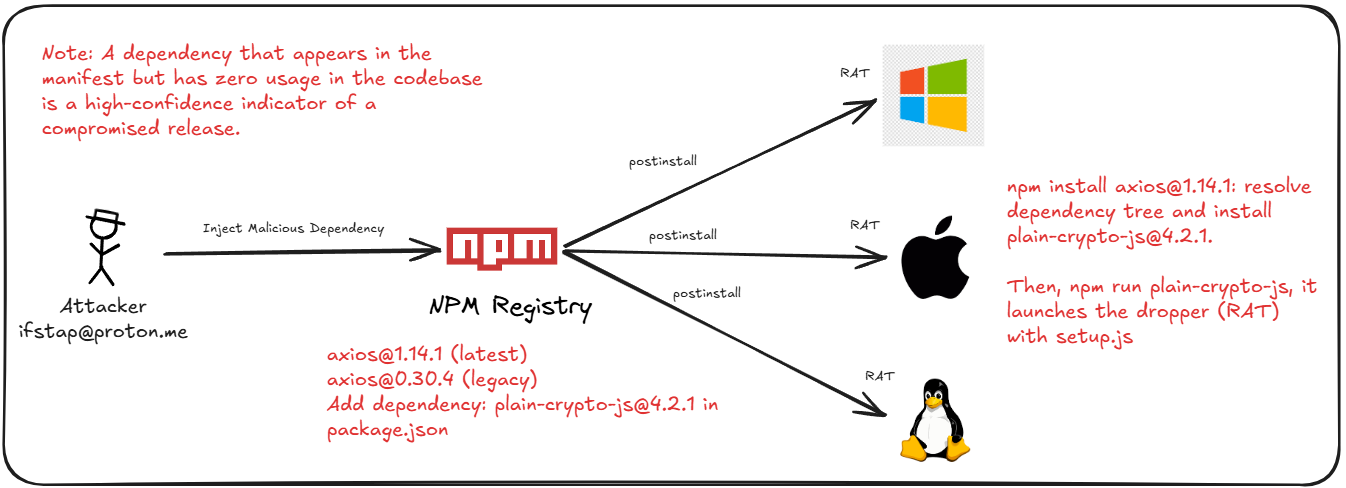
With access to the primary Axios maintainer account and the malicious dependency prepared, the final step was to release new versions of Axios (1.14.1 and 0.30.4) that silently included plain-crypto-js@4.2.1 as a dependency. Any developer or pipeline installing these Axios versions would unknowingly execute the malicious postinstall script, deploying the RAT malware.
axios@1.14.1 | axios@0.30.4 |
|---|---|
"plain-crypto-js": "^4.2.1" ← malicious | "plain-crypto-js": "^4.2.1" ← malicious |
Attack Timeline
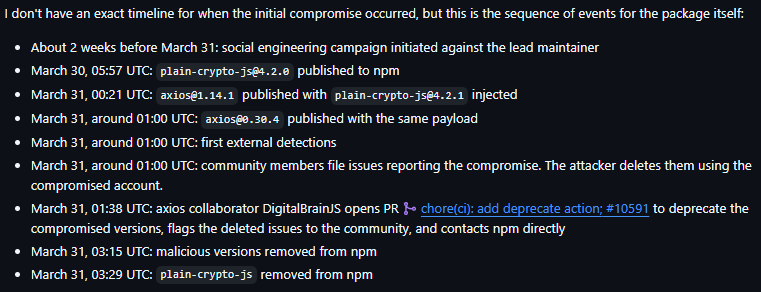
Campaign Active Window: 2026-03-31 00:21 UTC to 03:15 UTC (~3 hours). Both malicious axios versions were removed by the npm security team within this window.
Are You Compromised?
The following detection strategies should be applied across your environment to determine whether any exposure occurred during the campaign window.
In Version Control Repositories
Search your repositories for references to the compromised packages. If using GitHub, the following queries can help identify exposure:
org:[yourOrganization] "axios" "1.14.1" path:package-lock.json
org:[yourOrganization] "plain-crypto-js" path:package-lock.json
org:[yourOrganization] axios@1.14.1
Note: Broad queries may return false positives. Review results carefully and cross-reference with your lock files. Additionally, validate via the SBOM feature of your version control platform if available.
On Developer Machines
The attacker replaced package.json metadata with a clean version (4.2.0) as an anti-forensic technique, making version-based detection unreliable. However, the malicious dependency folder persists on infected systems. Search for:
- The presence of the
plain-crypto-jsfolder innode_modulesdirectories - Outbound network connections to
sfrclak.com:8000(142.11.206.73)
In CI/CD Pipelines
Review pipeline logs within the campaign window (2026-03-31 00:21–03:15 UTC), focusing on:
- References to poisoned axios versions (
1.14.1/0.30.4) or theplain-crypto-jsdependency - Outbound network traffic to
sfrclak.com:8000(142.11.206.73)
Note: Ephemeral runners self-destruct post-execution, but any secrets or credentials accessed during the run may have been exfiltrated. Persistent runners remain potentially infected and require immediate remediation.
Countermeasures
1. Disable Script Execution During Installation
The native capability to run pre/post-install scripts is a known attack vector. Mitigate this risk by enforcing script-free installations in your pipelines:
npm ci --ignore-scriptsReference: https://docs.npmjs.com/cli/v10/using-npm/scripts
2. Dependency Cooldown
Every new package version introduces risk. Implement a cooldown period before adopting new releases, blocking usage of any version published within a configurable time window. This reduces the probability of consuming a malicious package while a campaign is still active.
Reference: https://blog.yossarian.net/2025/11/21/We-should-all-be-using-dependency-cooldowns
3. npm Provenance Attestations
If you maintain and publish npm libraries, enable Provenance Attestations. This creates a cryptographically signed record at publication time, allowing consumers to verify: which repository the package originated from, who modified or published the version, and from which CI pipeline the update was built.
Reference: https://docs.npmjs.com/generating-provenance-statements
4. Trusted Publishers
Configure npm Trusted Publishers to restrict which repository, workflow, environment, and account are authorized to publish new versions of your library. This prevents unauthorized publishing through alternative mechanisms, including direct access to npmjs.com.
Reference: https://docs.npmjs.com/trusted-publishers
5. OIDC Flow for CI/CD Authentication
All connections from pipelines to external systems (e.g., npm) should use OIDC-based authentication. This eliminates the need for static, long-lived secrets or tokens, replacing them with short-lived, scoped credentials that expire after each use.
6. Immutable Releases
Enforce immutability on published releases to prevent silent modification of an existing version without changing the version number. Without this control, a threat actor with maintainer access could inject malicious code while preserving the same version tag and making detection significantly harder.
7. Publish Only from CI
Eliminate manual, local-machine publishing. By restricting publication exclusively to CI pipelines, you significantly reduce the blast radius in the event a developer’s workstation is compromised, the attacker gains no path to inject code into a published release.
Indicators of Compromise
Malicious Packages
| Type | Value |
|---|---|
| Package | plain-crypto-js@4.2.1 |
| Package | axios@0.30.4 |
| Package | axios@1.14.1 |
Network Indicators
| Type | Value |
|---|---|
| C2 Domain | sfrclak[.]com |
| C2 IP | 142.11.206.73 |
| C2 URL | http://sfrclak[.]com:8000/6202033 |
Malicious Files
| Type | Value |
|---|---|
| File | setup.js |
| SHA-256 | e10b1fa84f1d6481625f741b69892780140d4e0e7769e7491e5f4d894c2e0e09 |